Skip to Main Content or Page Contents

HTML5 & CSS 3 Tutorial
How to Add colour to a Web page Tutorial. Lesson 4
How to Use:
Colour Systems - Hexadecimal & Decimal
Safe colours
Colour Picker.
Page Contents - How to Add Colour to a Web page
Color Systems
Named Colours Choice of 140 names. Examples: red, blue, green, yellow
Hexadecimal Color System Uses Hexadecimal Numbers 00-ff. Examples: #ff0000, #0000ff, #00ff00, #ffff00
RGB Colour System Uses decimal Numbers 0-255. Examples: rgb(255, 0, 0), rgb(0, 255, 0) rgb(0,0,255), rgb(255, 255, 0)
RGBA Colour System As RGB Adds an Alpha channel - (transparency/opaque) 0.0 - 1.0. Examples: rgba(255, 0, 0, 0.2);
HSL Colour System Hue, Saturation, and LightnessUses percentage Numbers 0-100%. Example for red: hsl(0, 100%, 50%)
HSLA Colour System As HSL Adds an Alpha channel Example for red: hsl(0, 100%, 50%, 0.5)
0x Colour System. Same as Hexadecimal Color System use 0x in place of #
CMYK Colour System. Cyan, Mageta, Yellow, Black. Currently is a ink printing color not used in HTML or CSS but may possibly be used when CSS4 becomes usable.
Colour Systems used for Computer Screens
Which of the following answer is correct, when using light the three primary colours are
1. Red Blue Yellow
2. Red Green Blue
Lesson Introduction - How to Add Colour to a Web page
In this HTML tutorial you will learn that there are different ways to specify which colour to display on your Web page. This can be done by using 1 or more of the colour systems available:
- Named Colours. Such as red, black, blue. Very easy to use but limited to 140 different colours.
- Hexadecimal Color System. Most popular system. Uses Hexadecimal numbers for the RED Green Blue combinations. Over 16 million colours.
- RGB Colour System. Similar to the Hexadecimal System but uses decimal numbers.
- RGBA Colour System . Similar to RGB System with an additional decimal number for an Alpha Channel for the degree of transparency / opacity.
- HSL and HSLA Systems. Is a Hue, Saturation, Lightness system, and Alpha. Harder to imagine the resulting colour, and rarely used. Not covered in our tutorials.
Colour Names
Although 140 colours can be used by name e.g. black, blue, white etc. the accepted and safer method when writing HTML code, is to use the, either the Hexadecimal Color System or the Decimal RGB Colour System System which will give you a choice of a few million different colours, of which 216 are regarded as web safe colours.
See Full list of Web Colour Names & Web Safe Colours
Hexadecimal Color System
The Hexadecimal Color System uses the intensity of only three colours Red Green & Blue.
Hexadecimal number are base on 16 rather than 10 as used in the decimal system
They are 0 1 2 3 4 5 6 7 8 9 A B C D E F
Hexadecimal - Decimal Conversion Chart
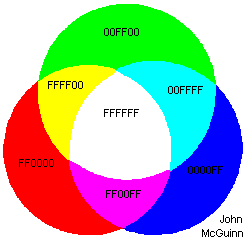
Diagram: Hexadecimal Colour Wheel
Imagine a Red spotlight, a Green spotlight & a Blue spotlight, all at full intensity in a theatre so that they slightly overlap as shown above.
- Where they don't overlap you have a red, green & blue sections
- Where 2 spotlights overlap there lights combine producing another colour
- Red + Green produces Yellow
- Green + Blue produces Cyan (almost turquoise)
- Blue + Red produces magenta (a lighter purple)
- Where all three lights overlap white light is produced.
- If the three spotlights are turned off, #00 (0 decimal) the stage is black
These spotlights can be slowly dimmed in #FF steps (256 decimal steps)
Imagine only the Red spotlight being turned on
- At full intensity of #FF (255 decimal) the red spot is a bright red
- As the intensity is reduced say to #8B we get Dark Red, #80 Maroon
- At a setting of less than #09 there would be very little light displaying being virtually black with a hint of very dark red.
- #00 is the equivalent as turned off producing Black
Each of the three colours Red Green and Blue, has this range in values #00 to #FF in the Hexadecimal Color System (0 to 255 in the hexadecimal system), this produces 256 values to each of these colours.
This system is capable of displaying over 16 million colours. (256 x 256 x256)
This concept may be a bit hard to grasp, but if you think of the reverse process when white light is split up into the colours of the rainbow by a prism understanding is easier.
What you need to remember
- Is that the red, green and blue colour values in the diagram are at the highest value.
- Lowering any value from #FF / 255 towards 00 will darken that colour and the corresponding overlapped colours. You are reducing the amount of light therefore moving away from white, towards black.
- Raising any number to #FF (255 decimal) is increasing the amount of light, therefore brightening the affected sections, and moving towards white.
RGB Hex Color System
Very similar to the hexadecimal system but used decimal numbers
Example
.colour1 {background-color: rgb(255, 0, 0);} /* red */
.colour2 {background-color: rgb(0, 255, 0);} /* green */
.colour3 {background-color: rgb(0, 0, 255);} /* blue */
RGBA Color System
RGBA color values are supported in IE9+, Firefox 3+, Chrome, Safari, and in Opera 10+
Takes the RGB system a stage further in that a fourth number, the Alpha channel, is included which relates to the opacity of the object, which allows the underlying background to show through the colour . Often used to place a text caption over a photograph.
- The Alpha channel number can be between
- 0.0 (Fully transparent)
- 1.0 (Fully opaque)
Example
.colour9 {background-color: rgba(255, 0, 0, 0.3);} /* red with a degree of transparency */
.colour10 {background-color: rgba(0, 255, 0, 0.3);} /* green with a degree of transparency */
.colour11 {background-color: rgba(0, 0, 255, 0.3);} /* blue with with a degree of transparency */
How many colours can be represented in the RGB system?
Old Computers
Old Computers may only be able to display 256 colours
The settings of your computer, your type of monitor and video adapter determine the maximum number of colours that can be displayed. If a colour can not be represented then the nearest available colour will be used. How this can be done is described in the next section.
Safe Colours
Out of 16.7million possible colours, there is a list of only 216 web safe colours that should give the same true colour on PCs and almost the same colour on Macs.
Starting at 0 the values are increased by 51 denary to 255. You may wonder why a strange number like 51 is used. If you calculate it out then 51 is 20% of 255.
Converting 51 denary, to hexadecimal you get 33 hex, so the values are increased from 00 by 33 hexadecimal to FF). Learn more about hexadecimal numbers
This allows combinations of the following hexadecimal numbers.
00, 33, 66, 99, CC, FF.
Question 3 From this list of 6 allowable numbers, how do we work out the total number of web save colours?
If you do not want strange colours or dithered colour patterns stick to these safe colours for your web page, text, background and graphic colours.
Question 4. Test you grasp of the Hexadecimal Red Green Blue theory and attempt to place the following safe RGB values
#006633, #66FFFF, #FFFF99, #990000, #999999, #9933FF
to the Samples 1 to 6 below.
The colours are sufficiently different for you to do this accurately. Looking at the Colour Wheel diagram should help.
Dithering
Depending on the computer system being used and how it is set up will depend on how many colours can be displayed. If the computer is set to 256 colours then only 256 colours can be displayed. The computer may try to simulate additional colours by dithering. This is a process where different colours are displayed on adjacent pixels in a chess board pattern. If we coloured the chess board with black and white squares then reduce the size of the board so that each square consists of a single pixel, then because the pixels are very small, this check board pattern gives the impression of a medium grey. Looking very closely at screen the pattern can be seen. Looking normally the eye blends the pattern into, in this case medium grey. This does not look as pleasing as a screen that displays all the pixels as medium grey.
A different pattern could have say 2 black pixels to every white one, producing the effect of a darker grey.
This patterning is very similar to how a TV screen works. Look at the screen through a reversed pair of binoculars with the eye piece held against the screen to see the individual red green and blue sectors. Look at a white area of the screen for the best effect where all 3 colours are at there brightest.
Most modern computers, with there improved memory, and hardware, can usually display in 32 bit true color, that does not require dithering.
Let's Add some Colour
How to Change the default Background and Text Colour
Alter the <body> tag as follows:
<BODY style="background: #CCCCCC; color="#FF0000;">
This will give you a lightish grey background and coloured text. The colour value for the text is a nice easy one and you should be able to work it out. You can experiment with the Hexadecimal colour values if you like.
Remember that you require the # and that you each CSS rule with ;
How to Change the colour of a single word.
Example
<p>How to Change the <span style="color: red"><strong>colour</strong> </span>of a single word.</p>
Result:
How to Change the colour of a single word.
- I have also emphasised the word colour by the use of the Strong element
- Nesting:
- Note how <strong>colour</strong> is nested inside of <span style="color: #red">---------------</span>
- You can include several words or even paragraphs instead of the single word colour used in this example.
- Try to do this now
- Don't forget
- Ensure you use the American spelling of color in the styling & not the British spelling colour
Exercise
- Copy & Paste the example code into an HTML file.
- Check that it works as expected.
- Now change the colour of the word 'Change' to blue, and change the colour of the words 'single word' to green
Colour Pickers
Most HTML editors have colour pickers built into the software.
Handy Colour Picker
Answers
Red Blue Green.
If you did not take physics at school you may remember from art classes that when mixing paints the three primary colours are Red Blue Yellow.
However when using light such as on a computer monitor, TV screen or theatre lighting the three primary colours are Red Blue and Green.
Just over 16.7 million.
We have 3 primary colours with 256 possible values for each colour. Therefore the calculation is 256^3,
or 256 x 256 x 256
=16,777,216
We have 3 primary colours with 6 possible values for each colour. Therefore the calculation is 6^3,
or 6 x 6 x 6 = 216
Return to Question 3.
The following, not very scientific, but give some clues on how you can visualise a number as a colour.
No 1. #990000
Only Red of the RGB numbers has a non zero value, FF would be a bright red, so 99 a must be a darker red.
No 2 #66FFF
Two numbers are FF, Green & blue which produces Cyan. The third value is 66 in a low central range in the Red band. This will push the colour turquoise towards white, therefore resulting in a bright and light turquoise.
No. 3 #999999
If all three numbers are the same then the colour must be white #FFFFFF, black #000000 or a shade of grey. #999999 is almost midrange there fore results in a mid grey
No 4. #006633
A darkish green, lightened with a touch of blue.
No 5. #9933FF
Probably the hardest to guess, but blue and red, results in magenta, lightened up more with green giving a brighter magenta or light purple
No 6. #FFFF99
Red and green give yellow, adding some blue lightens it.
Programs
Video Editor
Filmora 10 Video Editor
Hosting & Domains
Hostgator
This site is hosted on Hostgator
123 Reg
Bluehost
Norton
AVG
Web Site Templates

DVD Tutorials
Books
CSS: The Missing Manual
CSS Pocket Reference
Html5 and Css3 All-In-One for Dummies
Web Design
Build Your First Website In Simple Steps
Responsive Web Design with HTML5 and CSS3