Skip to Main Content or Page Contents
HTML5 & CSS 3 Tutorial
HTML Adding Web page Graphics
Tutorial 6. Graphics. Adding images to a Web page. Includes BMP, GIF, JPG, JPEG, PNG formats and animation
This Page's Contents
File Formats to use on a Web page
BMP A BMP is a Bit Mapped image
JPG, JPEG (Joint Photographic Experts Group)
PNG (Portable Network Graphics)
Preparing for Your Web Page that includes graphics
Preparing for Your Web Page that includes graphics
Graphics don't show on my web site
Common errors that prevent graphics showing on your web page.
How to place a Graphic Image on a Web Page
When wish to place an image on a web page you actually place a link to the image file which is stored somewhere on the internet
Example Code required to display an Image
<img src="image-name.gif" alt="Descripion of the image" width="32" height="32">
The code consists of the <img> Tag and the following attributes src, alt, width, height in HTML5
<img> Tag
src
Specifies the URL of an image/ i.e, The location of the image file.
alt
Specifies an alternate text for an image, usually a very short description this is used by speech readers for the visually impaired & also by search engines
width
Specifies the width of an image in Pixels for HTML5. Pixels or % for HTML 4.01
height
Specifies the height of an image in Pixels for HTML5. Pixels or % for HTML 4.01
Exercise Place an image on a web page
- Create a folder called images within your folder my-first-web-pages. See video
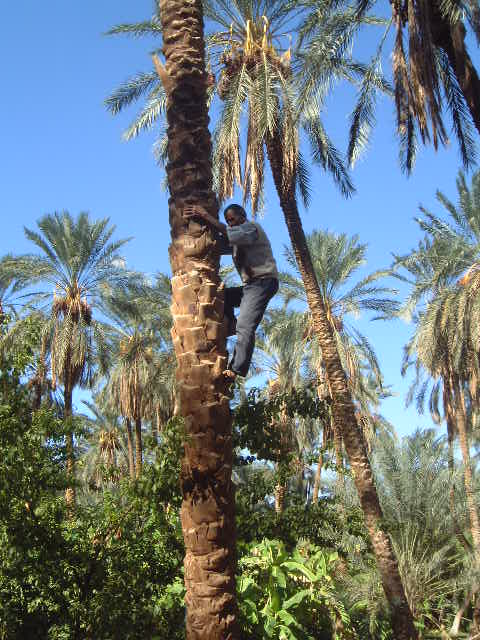
- Copy your image file(s) into this folder. You can use your own image(s) or use the image man-climbing-tree.jpg below.
- To use man-climbing-tree.jpg right click the image
- Select Save Image as...
- In the Save Image window navigate to the images folder within the my-first-web-pages folder and click it.
- Click
Savebutton
- Insert the code below into the source code of your web page at the required location .
<img src="images/man-climbing-tree.jpg" alt="Man climbing Palm tree"
width="480" height="640">
- Save your web page file
- Check with a browser that the image is displaying.
- If image does NOT display:
- Check that the spelling is correct. The spelling, use of upper/lower case & extension must be identical in both the code & the actual image file name.
- Check that the image file is located in the correct folder, you can use Windows Explorer to do this.
- Check that you have not used a space in either the image file name or image folder name
Graphics Introduction
The quality of your web pages can be greatly improved by the inclusion of graphic files within them. You do not require any additional programmes to do this. If you wish to create your own images or manipulate an image files you have, you will require a graphic editor program that saves work in the correct file formats, to do this.
The downside of images is that they greatly increase the download time. You will learn about how to minimise this problem, by using optimised image files, image files where the file size has been decreased in some way or other.
The things that effect the image file size can include, file format used, size of the image in width pixels x height pixels, number of colours used, the degree of file compression.
There are sources of free graphic files such as
- Programs already installed on your computer. E.g.
- Microsoft Office or Word.
- Most graphics programs.
- Downloadable from web, a list of Web sites can be found below.
- Photographs from your camera
Ensure you read the Copyright Section below before using anybody elses graphic files.

File Formats to use on a Web Page
The following formats are suitable
- gif
- jpg or jpeg
- png.
BMP
A BMP is a Bit Mapped image.
BMP files are very large files and are not as suitable as the ones below as a graphic file for the Web.
gif (Graphic Interchange format)
- Limited to a maximum of 256 colours.
- The file format can be compressed using lossy compression. (See JPG)
- Some versions allow a transparent image background, this allows the underlying background to show through
- Allow animations
- Allows interlacing- The image is generated in 3 passes. Pass one displays the even scan lines, passes 2 to 3 fills in every third odd scan lines. Interlacing allows the user to view a poor image reasonably quickly (pass one). The image quality improves with passes 2 and 3. Overall interlacing increases the download time.
Suitable for images
That have 256 colours or less and largish areas of the same colour.
Attempt to use only web safe colours in gif images.
Optimisation
The best lossy compression occurs when areas of the same colour are in horizontal bands. Keeps sharp edges and this format is good for line art, cartoons, blocks of the same colour.
Reduce the number of colours used reduces the file size
JPG, JPEG (Joint Photographic Experts Group)
- The .JPG & .JPEG formats are the same and the extension is interchangeable.
- These images use a lossy compression when they are saved. This means that information is lost. The degree of compression can be changed. The higher the compression, the smaller the file size, but more fine detail is lost. There is always a degree of compression and loss of detail every time a file is saved. If you are working on an image this should be taken into consideration. Repeated save and reloading the image into your graphic program will degrade the image.
- You should keep the original master copy to work from.
- Millions of colours
- No transparency
Suitable for images.
JPEG is far superior to GIF for storing full-color or grayscale images full of fine detail such as photographs and images with continuous colour variations, e.g. gradient colouring, or intricate artwork.
The jpg format is ideal for Photographs
Not as suitable for line art as the gif format
Optimisation
- Altering the amount of compression.
- The better graphics programs display the original image alongside the optimised image.
- Always save the optimised image under a different file name, keeping the original file safe.
- You can't improve the quality of an optimised image back to that of the original.
PNG (Portable Network Graphics)
The format produced by Adobe's Fireworks Graphic App.
- Allows transparency in the image
Top .
Preparing for Your Web Page that includes graphics
Folder
- Create a folder that will contain all your work, HTML file(s) and graphic file(s), Give this folder a suitable name For Graphic Exercise 1 call this folder Project6
- Decide if you will keep the graphic files in the same folder as your HTML file(s), or place them in a sub folder.
- Same Folder
- Only really suitable for very small sites i.e. with only a few pages (HTML files) and only a few graphic files.
- Sub Folder
- Suitable for larger sites or to practice with using a folder/ sub folder system.
- We will use a folder/ sub folder system for Graphic Exercise 1.
- Same Folder
Our suggestion is that you create a graphic folder and within this folder you create:
- A folder for graphics that are used for the site e.g, logo, bullets, backgrounds, buttons etc.
- A folder for graphics that are used as content. e.g, photographs, diagrams, artwork.
- In a large site you would probably sub divide your content into logical sub folders
Suggested Folder layout of Graphic folders for a large site
graphic
site
content
logical category 1
logical-category-2
logical-category-etc
My graphics don't display on my web site
There are several possible reasons that can cause this:
- Misspelling of the file name of the graphic.
- The upper/lower case do not match
- There are spaces in the file name.
- You have not uploaded the graphic file.
- You have uploaded the file but not to the correct location
Download Image Sites
http://www.google.com/imghp?hl=en
Google Image Search. More than 250,000,000 images indexed in this search engine. Images may be subject to copyright
http://www.echoecho.com/freegraphicsmultiple.htm
Menu Buttons, Background, images, Bullets,Dividers
http://www.dreamstime.com/free-photos
Free Photos
Free Photos
Free Photos
Free Logos
Icons - Free & also pay for
Loads of web page graphics - Backgrounds, Buttons, Clipart, Graphics Bullets, Clipart Arrows, Banners and Clip-Art
http://www.backgroundsarchive.com/
Image backgrounds & Desktop Backgrounds
Fancy Text Logos
Render a Logo or Render a Button FREE
Animated Gifs
GifGifs - Animated Gifs & Graphic Tools
Free Animated gifs
Online JPEG, Gif & PNG optimizer
Resize a GIF online
Add Text to GIF

Example Animated Gif
Giphy - Animated Gifs

Photoscape GIF editor
Easy photo editing software that enables you to fix and enhance photos.
Free version has Limited features.
Download from Photoscape
Free Graphic Editors
IrfanView
IrfanView is a very fast, small, compact and innovative FREEWARE (for non-commercial use) graphic viewer for Windows 9x, ME, NT, 2000, XP, Vista, Windows 7, Windows 8. 10
Download from IrfanView
Gimp
GIMP is used for producing icons, graphical design elements, and art for user interface components and mockups.
Download from
https://inkscape.org/en/
Inkscape is a professional vector graphics editor for Windows, Mac OS X and Linux. It's free and open source.
Copyright
The following is not the legal position but basically common sense tips I have picked up. Although I am talking about graphic files the same copyright laws also apply to text.
Somebody has put time and effort into producing a graphic files image and that person will own the copyrights to that image files. This right can be sold on to say a publishing company.
It is very easy to download graphic files from a web site. All you have to do is right click on the image and select the option to save it. Right clicking can be disabled by Java Script on the web page, but this is easily defeated by using a browser with Java disabled.
Using this downloaded graphic on your web page would be a breach of copyright, and you could be sued by the copyright owner.
If you wish to use other peoples graphics, then you must receive permission to do so. There is a certain amount of latitude given to students at colleges & universitys on web design or similar courses to use on line images in their course work, suitable acknowledgement should be given to the source & author. Presenting that work to the world from a non academic web site can remove you from that protection. The course will give you information on this.
Many of the free graphic sights will have a section stating the copyright policy. Read the small print to find out about this policy. Some of the common clauses are similar to the following.
The graphic is probably free to use:
- If it is going to be used on a non commercial site.
- If you place a link to the website where you downloaded the graphic from.
- They may provide a small graphic for this purpose.
- Acknowledge the source in some way.
- The Web sites vary, some stipulate the above, others request that you do more.
You will also find Web sites that offer graphics for a small, or not so small fee. Some of these Web sites will also produce custom graphics to order.
Top .Placing a graphic onto a web page
Software
Page Plus X8 (Legacy program)
Desktop Publishing
PaintShop Pro 2018 Ultimate
Graphic Program
PaintShop Pro X9 Ultimate
Older reduced version
Graphic Program
Books &/or CDs
PaintShop Pro 2018 Ultimate
Programs
Video Editor
Filmora 10 Video Editor
Hosting & Domains
Hostgator
This site is hosted on Hostgator
123 Reg
Bluehost
Anti Virus Software
Kaspersky
Norton
AVG
Web Site Templates

DVD Tutorials
Books
CSS: The Missing Manual
CSS Pocket Reference
Html5 and Css3 All-In-One for Dummies
Web Design
Build Your First Website In Simple Steps
Responsive Web Design with HTML5 and CSS3